How Brandon used audience data to cut down a ton of repetitive tasks.
Welcome to Day 13 of the 30 Days of Growth.
This is a pop-up newsletter put together by the team at Growth In Reverse. We’ve pulled 30 creators together to help give one short, actionable way you can either grow or improve your email list.
You can view past issues here.
Do you know who’s actually on your email list?
Not just “how many subscribers,” but the real stuff – what they do for work, how old they are, what income bracket they’re in. The kind of data that helps you write better content and pitch sponsors more confidently.
Brandon Smithwrick wanted to know this about his newsletter audience for Content to Commas. Beehiiv gives you a ton of raw data, but there’s no clean way to pull it together into something useful. So when Beehiiv rolled out their MCP in beta, he built a system to do it himself.
He was able to build an intelligence system that reads his data, grades every issue, and tells him exactly what’s working and who he’s writing to.
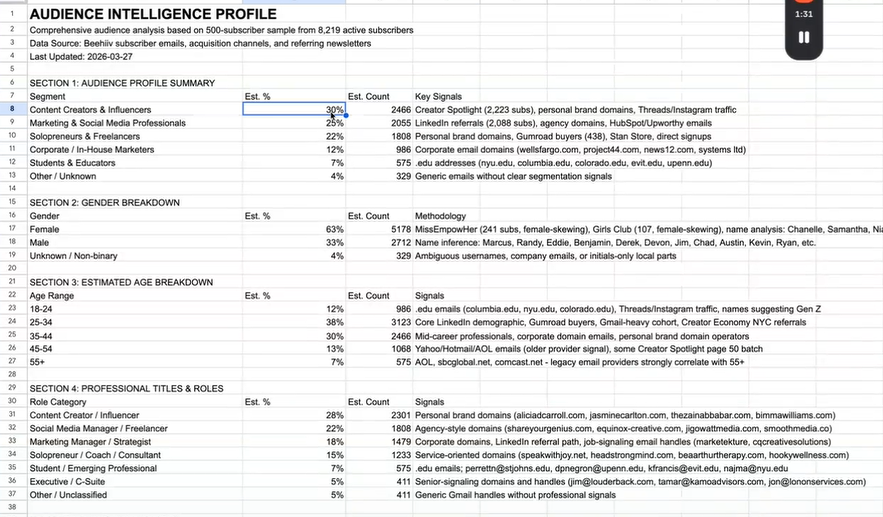
Since building that, his writing time dropped from 3 hours to 90 minutes, he discovered an 85.3% retention rate he didn’t know existed, and he learned his audience is 63% female-skewing (with the professions and income ranges he can now pitch to sponsors).
How Brandon Did It
Brandon got access to Beehiiv’s MCP (Model Context Protocol). If you’re not sure what that is, it essentially lets you connect a ton of data into a tool like Claude, that helps you understand that data better.
1. He connected Claude to Beehiiv’s new MCP. The MCP is what lets Claude pull data straight from his Beehiiv account, no CSV exports or copy-paste required.
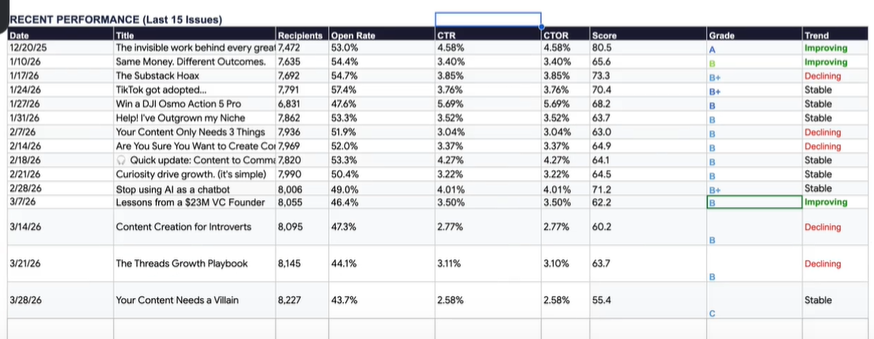
2. He pointed Claude at a new Google Sheet. Claude built him a dashboard that scores every issue, surfaces audience insights (like gender, age, profession, geography), and updates itself each week as new issues go out.
3. He set up a writing workflow next to the analytics. Brandon dictates his ideas into
4. The Claude agent is trained on Brandon’s voice. He fed Claude past issues, his SOPs, and the patterns from the analytics hub, so it can draft subject lines, titles, and help him create a newsletter with the audio he’s recorded.
5. He promoted himself from writer to Newsletter Editor. Once Claude pings him in Slack with a finished draft, he reviews, edits, and polishes. Brandon has gone from writer to editor.
Why It Works
Half the battle of writing a newsletter is knowing what to write about. The other half is sitting down and actually doing it. Brandon’s system helps him tackle both.
The intelligence side removes the guessing. He knows what topics land, what framing works, and who his audience actually is. So when he sits down to write, he’s not starting from “hmm, what should I talk about this week.” He already has a good idea of what should come next.
The Wispr Flow piece removes the blinking cursor problem. Talking is probably 3-4x faster than typing for most people, and it gets you past that “I don’t know how to start” feeling. Brandon talks it out, then uses Claude to clean up the structure. The ideas stay his.
Results
- Newsletter writing time dropped from 3 hours to 90 minutes per issue, a 50% cut every single week
- Surfaced an 85.3% reader retention rate that he didn’t know what there
- Found that 68% of his subscribers are women with specific professions, which is useful for sponsor pitches and content positioning
- Every issue graded 0 to 100 with a rolling 8-issue benchmark for instant context – his self-updating analytics dashboard that grades every new issue automatically
How You Can Implement It
Brandon’s nailed the use of AI to both publish quicker and better analyze metrics. This process is a little more complex than some of the other levers we’ve shared so far, but the time savings and in-depth metrics are worth the heavier lift at the onset.
Note: If you don’t use Beehiiv, save this growth lever for when your ESP releases their MCP. At this rate, it’s a matter of when, not if.
Step 1: See if your ESP has an MCP built out. Beehiiv’s is in beta, and I’m excited to announce that Kit is releasing theirs in just 2 weeks.
Step 2: Connect the MCP and Google Sheets to Claude inside CoWork. Both live under the Connectors menu. (If this is all new to you, there are TONS of great YouTube videos on this already)
Step 3: Run a prompt to build your analytics sheet. Brandon’s full prompt is in his Notion writeup. Paste your newsletter URL in and let Claude pull and structure everything.
Step 4: Feed Claude your voice. A short doc with past issues, notes about your tone, preferences, and your usual structure is enough for the agent to draft similarly to you.
Step 5: Add a trigger you’ll actually use. Brandon’s is a
Step 6: Review and edit the drafts Claude hands back. Editing what’s already there is faster than writing from scratch.
Disclaimer – What we’re not doing is telling you to “automate your newsletter” with AI. What I am saying is that you can use these tools to help you inform what to create next (or not), use a voice mode to do speech to text, and then have AI help you refine that piece with past issues of your voice. I could write a whole article about the downsides of trying to automate everything, but for now, I’ll say that.
Tools
- Claude CoWork
- An MCP (either Beehiiv or Kit)
- Google Sheets
- WisprFlow for voice-to-text input
Knowing what to write is half the work. Brandon built a system that helps him answer that question for him every week, so he can spend his time actually writing instead of guessing.
The data tells him what works. Voice dictation gets it out of his head fast. And every issue builds on what he learned from the last one.
See you tomorrow,
Chenell
P.S. You can follow Brandon on LinkedIn, or subscribe to Content to Commas for more newsletter operator tips.