Let Overwhelmed Readers Take a Break Instead of Leaving for Good
Welcome to Day 30 of the 30 Days of Growth.
This is a pop-up newsletter put together by Chenell from Growth In Reverse. I’ve pulled 30 creators together to help give one short, actionable way you can either grow or improve your email list.
You can view all past issues of the 30 Days of Growth here.
Have you ever been so overwhelmed with the number of emails you were getting that you started mass unsubscribing from everything?
Yes? That’s because you’re human!
As people who send emails, here is how we can help readers out.
Instead of only giving people the option to unsubscribe, what if we gave them the option to take a break from emails?
I originally saw this in the 2 Sigma newsletter.
When you click that link, you land on a page that says “see you soon, not goodbye.” It’s got a picture of the person, a friendly note about email overload being real and everyone needing a break sometimes. You put your email in, hit “unsubscribe for a month,” and you get a “done, we’ll see you in a month.”
I loved this so much I implemented it for myself, and you may have seen this before.
How I Set Up My Own Version
I liked this enough that I rebuilt it for my own list in Kit. Here’s the actual setup, and it’s simpler than it sounds.
At the bottom of a broadcast, I added a line: “need a little break from email overload? You can skip a month here.”
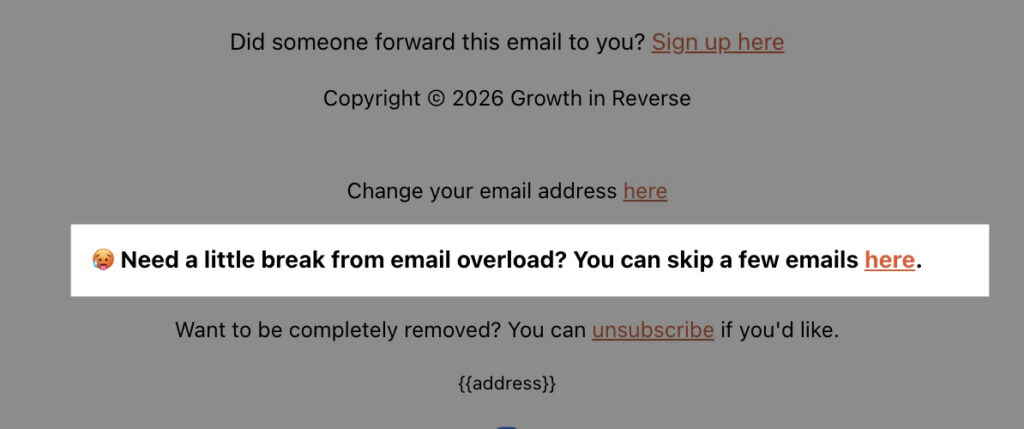
I didn’t want to use a “link trigger” where people click a link and have a tag added, because I find those to be super unreliable anymore. Instead, I setup a separate landing page people need to “opt in” to take a break. Then you need to:
- Add anyone who wants to “skip emails for a month” to a custom tag.
- Create an automation watches for that tag. When someone gets added to it, the automation waits 30 days, then removes the tag.
- On every broadcast I send, I go into the filters before hitting send. I match subscribers against “none of the following” and add the “skip emails for a month” tag there. That drops the paused folks out of the send.
So the tag is essentially a 30-day timer. While it’s on, those people don’t get emails. When it expires, they roll back in automatically. No manual cleanup which is nice.
The one thing to remember: this filter has to be on every broadcast going forward, or paused subscribers start getting emails again.
I duplicate my broadcast each week so it carries over, but if you build from a template, bake the filter into the template so you’re not thinking about it every send.
Why It Works
The reason someone unsubscribes might not be your content. It’s the volume of it. They’ve got a folder full of your past emails they haven’t gotten to, and unsubscribing is the only lever in reach to make the guilt stop.
They get the break they actually wanted, and you keep the subscriber. In 30 days they come back without you doing anything.
I’ve had people tell me the deep dives get overwhelming, or that they’ve got a stack of my old emails sitting unread. Honestly that makes me feel a little bad, like I’m clogging up their inbox. This gives those people an easy out that isn’t a goodbye.
They’re skipping a few emails, not leaving.
Results
The results I’ve seen from this?
- 514 people have been “saved” from unsubscribing.
- Emails with people saying “thank you” for giving them that option
Even if it was one person who used this, I would have been happy with that.
How You Can Implement It
Step 1: Add a line to the bottom of your broadcast: “need a little break from email overload? You can skip a month here.”
Step 2: Decide where the link goes. A dedicated page with a friendly note and your face works best (it reassures people it’s a pause, not a delete).
Step 3: Set the link to tag clickers with something like “skip emails for a month.”
Step 4: Build an automation: when that tag is added, wait 30 days, then remove the tag.
Step 5: On every broadcast, add a filter that excludes anyone with that tag. In Kit it’s the “match none of the following” filter.
Step 6: Put that filter in your broadcast template (or your duplicated broadcast) so it carries forward automatically. Don’t forget this step!
Tools
- Your ESP, with click-triggered tagging, automations, and broadcast filters (I use Kit)
- A “skip a month” page or a simple confirmation page for the link to point to
Most newsletters give readers 2 options: stay subscribed or leave. The “skip a month” link adds a 3rd – which is the one a lot of people wanted in the first place.
It costs you a little time to setup, but in exchange, you stop losing subscribers who were never really unhappy with you, just with their inbox.
If you set it up, let me know how it goes.
Chenell
P.S. That’s the last one in the 30 Days of Growth series. Thanks for reading all 30 days with me. It’s been a blast.
P.P.S. If you got any value from this, can you let me know by replying to an email?